|
TRADUÇÕES:
Obrigada aos nossos tradutores!
Material
Enfeite_Patchwork_Elaine2021
Miz_Mask_031 Roteiro
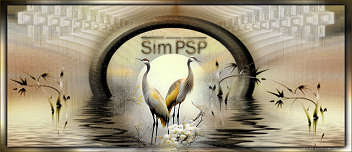
01- Abrir o material no PSP, duplique e feche o original. Escolher uma cor do Tube Misted ou do Tube Principal. Abra uma imagem transparente de 900x600px. Pintar com a cor escolhida.
Selections > Select All.
Edit
> Copy no Misted Paisagem. Selections > Select None.
03- Edit > Copy no Enfeite_Patchwork_Elaine2021 Edit > Paste as new layer.
Pintar com a cor #FFFFFF (branco).
Layers > Merge > Merge Group.
Edit > Paste as new layer.
08-
Edit > Copy no tube principal Posicione à sua direita. Effects > 3D Effects > Drop Shadow à sua escolha.
Com a
Ferramenta Deform Tool, posicione: (X 216) (Y 479).
Selections > Select All.
Edit > Paste as new layer.
16- Aplicar sua marca d'água ou assinatura. File > Export > JPEG Optimizer.
CREDITOS Tutorial by Elaine. Tube e Misted by Elaine Enfeite_Patchwork_Elaine2021 Enfeite_brush_Pascoa_Elaine2021 Brush_Enfeite_Elaine2021 Não autorizo modificar as imagens e enfeites criados por mim para este tutorial.
Sinta-se à vontade para enviar suas versões. Terei todo o prazer em publicá-las em nosso site.
|